AnVir Task Manager5.4
Publisher Description
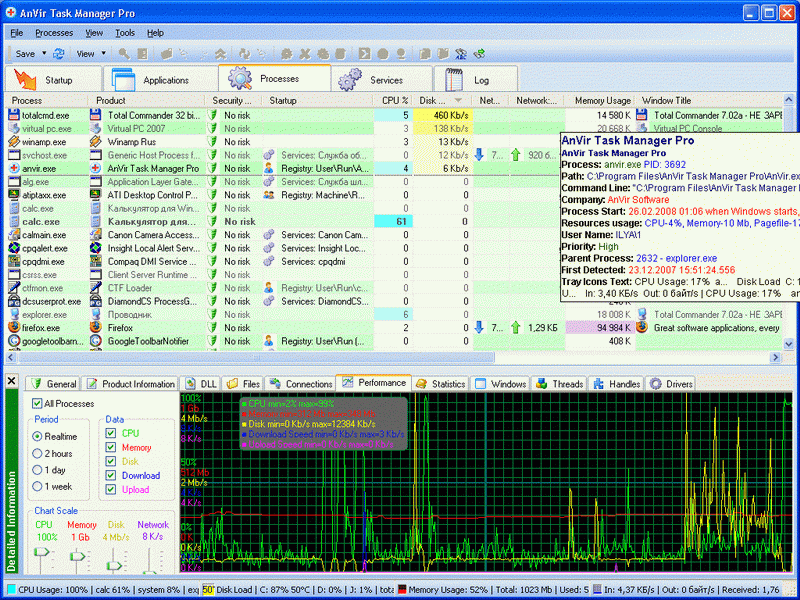
AnVir Task Manager provides full set of Windows enhancements that help in every-day work
Security Performance:
* Full information about processes, services, Internet connections, drivers, DLLs
the best replacement for Windows Task Manager
* Descriptions for 70 000 startup programs, Internet Explorer toolbars and services
know what is running on your PC and remove what you don't need
* Security analysis of programs behaviour detects Trojans and Spyware, alerts on new startups
keep your computer free from malicious programs
* Speed up boot time (Delayed Startup), balance CPU usage, optimize memory
your computer can run faster
* Run programs as services on Windows startup, save process priority, monitor TCP/UPD
best choice of IT Professionals
Windows enhancements:
* Monitor CPU, memory, HDD temperature and load, network, notebook battery and show icons in system tray
* how is utilized your hardware?Click on title of any application to hide the window to tray, make it transparent, set it 'always on top'
* List of recently used folders in "Open"/"Save" dialogs
* Last launched programs and folders in tray menu
XP or Vista can be much more handy
Capabilities:
* Attractive user interface
* Can replace Windows Task Manager
* Can run as portable application
* Compatible with all popular antivirus
* Check files with 30 antivirus engines
* Search on Google with one click
* Save HajackThis log
Looking for a crack, patch, serial number, registration code or key generator (keygen) is illegal.
http://www.anvir.com
About AnVir Task Manager
This Launchers & Task Managers program is available in English. It was last updated on 29 September, 2026. AnVir Task Manager is compatible with the following operating systems: Windows, Windows-mobile.
The company that develops AnVir Task Manager is Windows XP processes, remove spyware. The latest version released by its developer is 5.4. This version was rated by 2 users of our site and has an average rating of 4.0.
The download we have available for AnVir Task Manager has a file size of 1.0 MB. Just click the green Download button above to start the downloading process. The program is listed on our website since 2008-11-01 and was downloaded 232 times. We have already checked if the download link is safe, however for your own protection we recommend that you scan the downloaded software with your antivirus. Your antivirus may detect the AnVir Task Manager as malware if the download link is broken.
How to install AnVir Task Manager on your Windows device:
- Click on the Download button on our website. This will start the download from the website of the developer.
- Once the AnVir Task Manager is downloaded click on it to start the setup process (assuming you are on a desktop computer).
- When the installation is finished you should be able to see and run the program.
Program Details
System requirements
Download information
Pricing
Version History
version 5.4
posted on 2008-11-01
* Localization to German, Italian, Japanese and others.
* Vista / XP Tweaker - tool to set up Windows settings.
* On Windows XP show drive's free space with a colored horizontal bar in Windows "My Computer" (Vista style drive icons on Windows XP).
* Run programs on startup as floating icons or minim
version 4.9.5
posted on 2008-02-14
• Security analysis of processes, startup programs and Windows services.
• List of last opened folders in system tray.
• Internet Explorer Objects in startup monitor: Browser Helper Objects, Internet Explorer Toolbars, Internet Explorer Menus, Internet Explorer Extensions.
